GeoTools

OSGeo

Showing posts with label example. Show all posts

Tuesday, May 6, 2014

Filter Cleanup and ECQL Fixes

Quick update from the GeoTools development pipeline. It is kind of a tricky update to be excited about ... here is what it looks like:

Eclipse Auto-Complete

So what are you looking at? You are looking at Eclipse auto-complete for Filter. Since GeoTools 2.3 we have had two filter interfaces in the system:

a) org.opengis.filter.Filter - read only interface from GeoTools 2.3
b) org.geotools.filter.Filter - read/write interface from GeoTools 2.0

For the next release of GeoTools we are down to one, making GeoTools that much easier to get started with.

FilterFactory2 ff = CommonFactoryFinder.getFilterFactory2();
Filter filter = ff.equals(ff.property("type"), ff.literal("city"));
SimpleFeatureCollection features = source.getFeatures( filter );

More importantly, and the motivation for the work, no more surprising ClassCastExceptions. Thanks to Boundless for sponsoring this work (and Andrea for reviewing the pull request).

Another bit of code seeing some love is the ECQL representation of Filter. ECQL is our "enhanced" version of OGC common query language.

String cql = ECQL.toCQL(filter);

Will produce: type = 'city'

In effect ECQL is similar to the "WHERE" part of an SQL statement. Be aware that GeoTools is not executing SQL directly, instead the filter data structure is translated into SQL specific for each database we support.

I took the opportunity to make sure some of the more interesting ECQL output correctly:

filter = ECQL.toFilter("type IN ('city','town')");

Thanks to Andrew Hulbert on the geotools-user list for helping catch these glitches.

For more information on filter check out our documentation on the subject.

Friday, October 4, 2013

Randomized Fill

Quick cool new feature thanks to the always impressive @geowolf. Andrea is a man of few words and many examples so let me turn you over to his email.
Hi, 
The randomized fill support discussed some time ago has landed on trunk. 
Cheers 
Andrea 
PS: A note about the params and their default value:
  • random: false
  • random-seed: 0 (the seed for the random generator, change its value to get a different distribution at the same density)
  • random-symbol-count: 16
  • random-tile-size: 256 (the size of the tile... this default is large for small symbols... but ok for larger pictures...)
  • random-space-around: 0 (conflict resolution control, similar to labels, < 0 allows for overlap, > 0 pushes symbols further apart)
  • random-rotation: false (whether to randomly rotate the symbols as well, or not)
  • random-grid: true (if true the symbols are randomized around the centers of a regular grid, when false it's really fully random)
PPS: I'd wish to port it back to the stable series next month if nothing breaks
Thanks to New South Wales Geological Survey for sponsoring this work.

(Check out the original email for the XML code examples, click on the images for larger size).

Randomized Slash Symbols

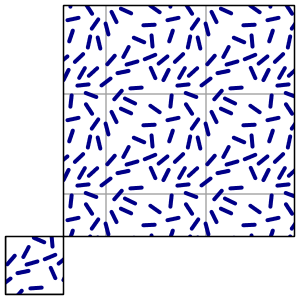
Here is one with randomized "slash" symbols, with a background box fill that helps visualize the "unit" of the random fill, the image that is getting repeated over and over:
In this case the randomization is grid based, that is, symbols are not actually
spread out fully randomly, each of them is actually placed at a controlled random 
distance from the centers of an invisible grid. Random, but not completely so.

Fully Random without Rotation

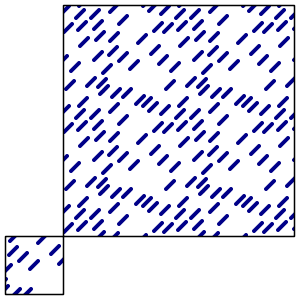
Here is one fully random, and without random rotation. As you can see, there are some holes
in the pattern that the gridded version did not have.


Fully Random


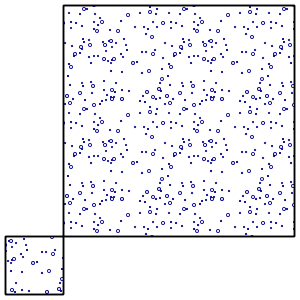
Here is a fully random one, actually, two, superimposed (see how the seed got changed to avoid getting
the same point distribution twice in a row, which would have made the larger circles just cover the small ones).


Theme Example


As a closing example, the usual topp:states depicted using varying dot density: